Homework: Path Search
Using queues to do some actual work
The Process
These homework assignments have more moving parts then you've worked with in the past. We'll talk through a lot of them in class and lab, but putting it all together – and finding bugs in a bigger program - is still a challenge. Don't wait to start, you should be working on this continuously so that what we do in class and lab is most helpful.
Check-out the hw1 directory from SVN. In there, you'll find two existing classes that I've made for you to use: position and map. Create your project and use Add Existing Item to add my classes. The repo also contains some test map files that you will use.
https://cssvn.utrgv.edu/svn_etomai/201720_2380/hw01_search/<your username>
As always, it is fine to discuss with people and ask and answer questions, but make sure you are doing you own work. Never, ever, ever pass files around, and don’t stare at someone else's code while you write yours. It's too easy to inadvertently type in verbatim, which is still copying.
Your submission will be graded based on whether it works, how it is designed and code clarity. You will lose points for poor indenting, bad or inconsistent variable names, or failing to use reasonable comments to explain what you are doing. Make sure to put your name in a comment at the top of your files.
Show Me Something
In this homework, we have an intrepid adventurer trying to find their lost dog in a maze. Your program is going to find a path from their position to the dog.
The map class that I gave you already has the ability to read in a text map file, store the information from the map and let you ask questions about it. Each map is a complete rectangle. You can ask:
- The width and height of the map
- The position of the adventurer (the start position)
- The position of the dog (the end position)
- Whether a certain position is blocked or not
Positions in the map are specified by row and column, using the position class. Rows and columns are counted from 0, like we always do in code.
Take a look at the position and map classes. You don't need to worry about how map works, just what functionality it offers (the public methods). You'll notice that most of the parameters are passed by reference with the keyword const before them. This is the typical convention in real projects, because it avoid an unnecessary copy, but uses const to indicates that the parameter cannot be changed in that function. That way you don't accidentally alter a reference parameter that was intended to be input-only.
Your first job is to use the Map class to read in a map file, and write a display function that takes a Map object (by reference!) to display it at the console like this:
- Positions that are blocked should be shown as
X - Position that are open should be shown as empty space
- The start position should be shown as an
A - The end position should be shown as a
D
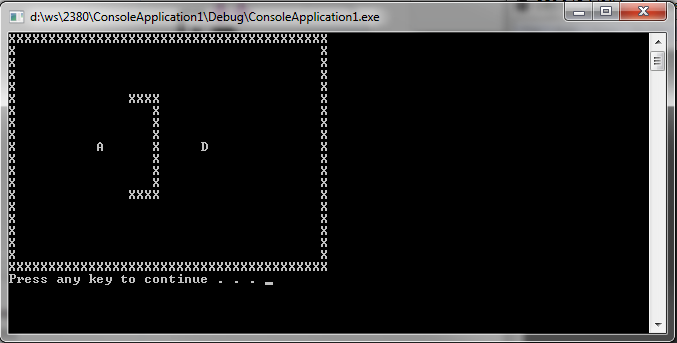
from testmap2.txt
Make that work before tying to move on!
Get Out
Your next job is to find that path.
There are several ways to find a path from point A and point B, but they all involve searching. That is, take the next step, then the next, then the next and see if you get where you're trying to go. If not, try a different one. The tricky parts are:
- Making sure you don't go back over places you've already been
- Making sure that you don't settle for a longer path when a shorter one is available
- Knowing when to quit because there is no path
One solution to this problem is called Breadth First Search (BFS). In this approach, you check all the spots 1 step away from you. Then all the spots 2 steps away. Then 3 and so on. This guarantees that if you do find the end, there couldn't have been any shorter paths. When you run out of positions to check, you know that you're done. Here's what it looks like in practice. The * indicate positions that we have checked.
BFS is implemented with a queue. The algorithm looks like this:
- Push the start position onto the queue
- While the queue is not empty...
- Pop the front position off the queue
- If it is the end, we're there! Declare success!
- Otherwise, push all the unblocked, unvisited neighbors of that position onto the back of the queue
- If the queue empties and we haven't found the end, there is no path
The key detail is in step 2.3, that we only add unvisited neighbors. That is, positions you can move to from the current position which we haven't checked yet. In our adventurer and dog problem, we'll say that the adventurer can only move left, right, up or down. That means that each position has up to 4 neighbors (the positions on the edges have 2 or 3).
The reason a queue works here is that all the one-step-away positions get in line first, then the two-step-away positions and so on.
Add your queue from lab04 to the project. Modify it to hold positions. Then add a function to your code that takes a Map object (by reference!) and performs a Breadth-First Search. For now, you don't need to store the actual path. Just return true if there is a path from start to end in that map, false otherwise. Here is a skeleton to get you started.
bool FindPath(Map &map)
{
  // create a queue object

  // push the starting position (from map) onto the queue

  // while the queue isn't empty

    // pop the next position off

    // check if that position is the end position

      // if so, return true!

    // otherwise, repeat this code for each of the four potential neighbors

    // if it's not off the map (e.g. position 0,1 doesn't have a neighbor to the left)
    // ...and not blocked
    // ...and hasn't already been visited
      // then push onto the queue and have the map mark it visited

  // if the queue empties and we haven't found the end, return false

}
In main, call your FindPath function and print whether or not a path was found for that map. Test maps 1,2 and 4 all have paths, but 3 does not.
Make that work before tying to move on!
Everywhere I Roam
Your next job is to make it look cool by showing the search progress and the final path.
Example from testmap4.txt
Update your display function to show visited positions as *. Then, each time through the loop in your FindPath function, display the map. Use this statement to clear the screen before each display call, creating a cheap animation effect.
system("cls");
The system calls are Windows-only, but you can find an equivalent in MacOS and/or Linux.
Next, show the actual path that was found. In order to do this, you have to keep track for each position of what position you came from. This is why the Map::MarkVisited method requires 2 parameters: the position being visited and the position you're coming from. When you find the end of the path in FindPath, call the Map::GeneratePath method and it will figure out which positions are part of the final path. Finally, update your display function to show OnPath positions as ..
- To show the final path, you'll want to add a parameter to
displayto hide the visited positions, so it looks nice - Do not call
Map::GeneratePathbefore you've found the complete path, or unexpected things will happen